
Robot vacuums have become a household staple, taking the chore out of floor cleaning. But even the most advanced robots need maintenance, and that often means replacing worn-out parts. This guide will help you navigate the world of robot vacuum spare parts in the UK, ensuring your robotic cleaner continues to perform at its best. We’ll cover everything from identifying the right parts to where to buy them, and even whether a DIY repair is worth your time.
As an Amazon Associate, we earn from qualifying purchases. This means we may receive a small commission at no extra cost to you when you buy through links on this page.
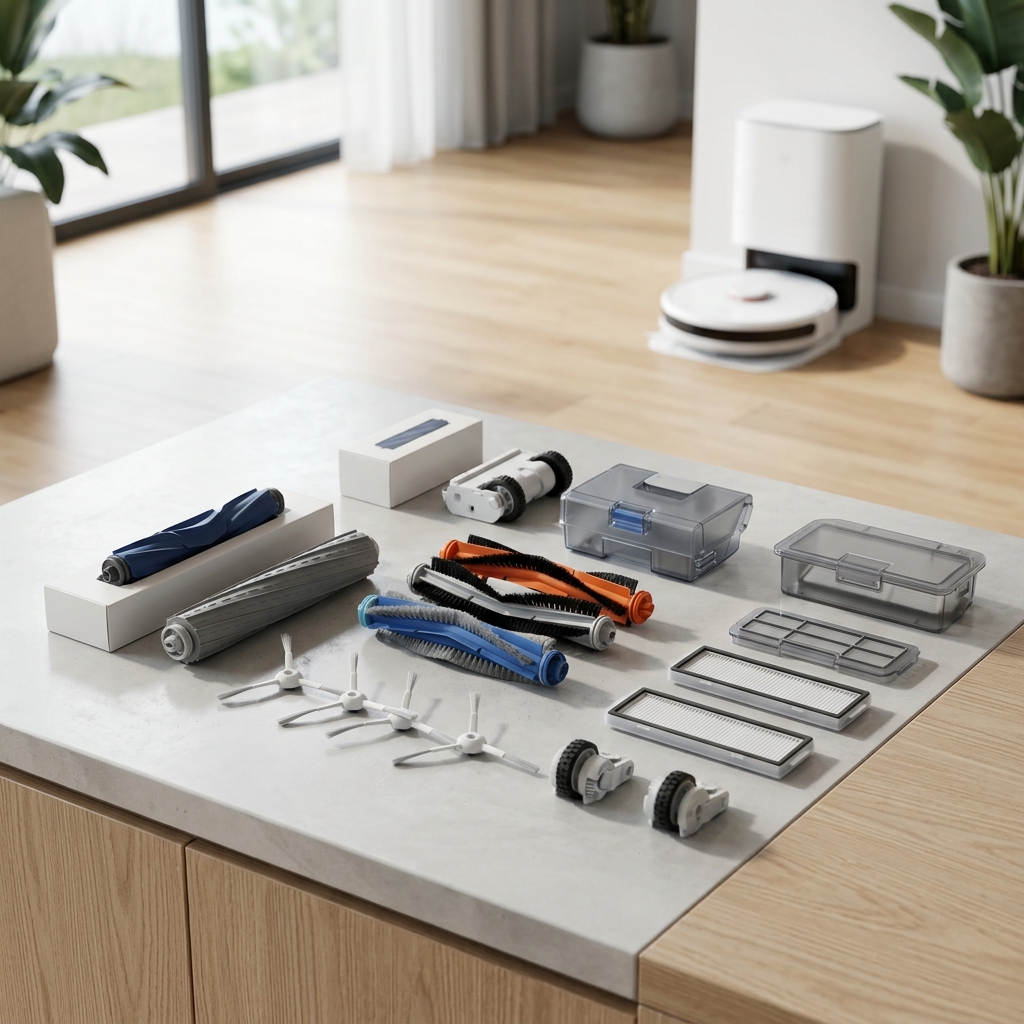
Table of Contents
Why Replace Robot Vacuum Parts?
Replacing parts on your robot vacuum isn’t just about fixing a problem; it’s about preventative maintenance. A worn brush won’t clean effectively, a clogged filter reduces suction, and a failing battery shortens cleaning sessions. Ignoring these issues leads to decreased performance, and eventually, the need to replace the entire robot – a far more costly outcome. Common signs your robot vacuum needs new parts include:
- Reduced suction power
- Streaking or leaving debris behind
- The robot struggling to navigate
- Error messages or unusual noises
- Significantly shorter run times
Common Robot Vacuum Parts That Need Replacing
Here’s a breakdown of the most frequently replaced robot vacuum parts, along with their typical lifespan:
- Main Brush (Brushroll): 6-12 months – Collects hair, dirt, and debris. Wears down with use, especially on carpets.
- Edge Brushes (Side Brushes): 3-6 months – Cleans along walls and in corners. Prone to bending and wear.
- Roller Brush (for some models): 6-9 months – Found in some hybrid vacuum-mop robots.
- Filters (HEPA & Standard): 1-3 months (Standard), 6-12 months (HEPA) – Trap dust and allergens. Need regular replacement to maintain suction and air quality.
- Batteries: 1-3 years – Battery life degrades over time, reducing run time and cleaning area.
- Wheels: 1-2 years – Can become clogged with hair and debris, affecting movement.
- Dustbin: As needed – Typically doesn’t *need* replacing, but can crack or become damaged.
- Sensors: 2-5 years – Detect obstacles and prevent falls. Can become dirty or damaged.
- Mop Pads (if applicable): 1-3 months – For robot vacuum-mop combos. Need frequent washing or replacement.
Finding the Right Spare Parts: Compatibility is Key
The most crucial step is ensuring you purchase the correct parts for YOUR robot vacuum model. Using incorrect parts can damage the robot or void the warranty. Here’s how to identify your model number:
- On the Robot Itself: Look for a sticker underneath the vacuum, often on the bottom or in the battery compartment.
- In the Manual: Your robot’s user manual will clearly state the model number.
- Original Packaging: The box your robot came in will have the model number printed on it.
Genuine vs. Compatible Parts: Genuine parts are manufactured by the robot’s original manufacturer (e.g., iRobot, Shark). They are typically more expensive but guaranteed to fit and perform optimally. Compatible parts are made by third-party companies and are often cheaper. While quality varies, many compatible parts offer good performance for a lower price. Read reviews carefully before purchasing compatible parts.
Where to Buy Robot Vacuum Spare Parts Online in the UK (2026)
Here’s a review of the best online retailers in the UK for robot vacuum spare parts:
| Retailer | Pros | Cons | Typical Price Range |
|---|---|---|---|
| Official Manufacturer Stores (e.g., iRobot, Shark, Roborock) | Guaranteed compatibility, high quality, direct support. | Generally the most expensive option. | £20 – £100+ |
| Amazon UK | Wide selection, competitive prices, fast delivery (with Prime). | Quality can vary depending on the seller. Check reviews carefully. | £5 – £80+ |
| Specialist Robot Vacuum Parts Retailers (e.g., Robot-Spares.com) | Specialist knowledge, often stock a wider range of parts for older models. | Can be slightly more expensive than Amazon. | £10 – £60+ |
| Comparison Shopping Sites (e.g., PriceRunner, IDEALO) | Helps you find the best prices across multiple retailers. | Doesn’t sell directly; redirects you to other sites. | Varies |
Top Brands & Their Spare Parts Availability
- iRobot Roomba: Official iRobot UK Accessories – Excellent availability of genuine parts. Expect to pay a premium. (Example: iRobot Roomba i7+ Replacement Filter Kit – £25.00)
- Shark: Shark UK Spare Parts – Good availability, particularly for brushrolls and filters. (Example: Shark IZ400UK Replacement Brushroll – £30.00)
- Eufy (EcoVacs): Eufy Support – Parts – Parts are available but can sometimes be out of stock. (Example: Eufy RoboVac 11S MAX Replacement Filter – £15.00)
- Roborock: Roborock UK Spare Parts – Excellent availability of genuine parts, including main brushes and mop pads. (Example: Roborock S7 MaxV Ultra Main Brush – £40.00)
- Dyson: Dyson UK Spare Parts – Parts are available, but tend to be expensive. (Example: Dyson 360 Vis Nav Robot Vacuum Battery – £80.00)
DIY Robot Vacuum Repair: Is It Worth It?
Many robot vacuum repairs are surprisingly straightforward. Replacing brushes, filters, and wheels is typically easy and requires minimal tools. Battery replacements are slightly more complex but manageable with a little patience and a screwdriver. Numerous online resources are available:
- YouTube: Search for “[Your Robot Model] Repair” to find video tutorials.
- iFixit: iFixit offers detailed repair guides for many electronics.
However, complex repairs—like sensor replacements or motherboard issues—are best left to professionals. Attempting these repairs yourself could damage the robot further. Consider the cost of parts versus the cost of professional repair or replacement.
Maintaining Your Robot Vacuum to Extend Part Lifespan
Preventative maintenance is key to extending the life of your robot and its parts:
- Regular Cleaning: Empty the dustbin after each use. Clean brushes, filters, and sensors weekly.
- Filter Maintenance: Tap filters regularly to remove dust. Replace them as recommended.
- Avoid Obstacles: Clear cords, small objects, and pet toys from the floor to prevent tangles and damage.
- Proper Storage: When not in use, store the robot in a cool, dry place.
Robot Vacuum Battery Replacement: A Comprehensive Guide
Replacing the battery is a common repair. Here’s a guide:
- Find the Correct Battery: Use your robot’s model number to find a compatible battery.
- Safe Removal: Turn off the robot and disconnect it from the charging base. Follow the manufacturer’s instructions for battery removal (typically involves screws).
- Installation: Connect the new battery, ensuring the polarity is correct. Secure it with screws.
- Disposal: Dispose of the old battery responsibly at a designated recycling point. Do NOT throw it in the general waste.
(Example: iRobot Roomba Battery Replacement – £65.00)
(Example: Universal Robot Vacuum Side Brushes (Pack of 6) – £10.00)
(Example: Robot Vacuum HEPA Filter Replacement (Multi-Brand) – £12.00)
FAQ
Q: How often should I replace my robot vacuum’s filter?
A: Standard filters should be replaced every 1-3 months, while HEPA filters typically last 6-12 months. The frequency depends on usage and dust levels in your home.
Q: Are compatible parts as good as genuine parts?
A: Quality varies. Many compatible parts offer good performance at a lower price, but it’s essential to read reviews and choose reputable brands.
Q: Can I repair my robot vacuum myself if I’m not technically inclined?
A: Simple repairs like brush and filter replacements are usually easy. More complex repairs are best left to professionals.
Q: Where can I safely dispose of my old robot vacuum battery?
A: You can dispose of old batteries at most electronics retailers, local recycling centres, or designated battery recycling points.
Q: What does it mean if my robot vacuum says “Brushroll Error”?
A: This usually indicates that the brushroll is tangled with hair or debris. Turn off the robot, remove the brushroll, and clear any obstructions. If the error persists, the brushroll motor may be faulty.