
Table of Contents
Introduction: Why Robot Vacuum Maintenance Matters
Robot vacuums have become increasingly sophisticated in 2026, offering features like advanced mapping, object recognition, and even self-emptying dustbins. From the iRobot Roomba j7+ (Complete Clean Bundle) at £799.00 to the more affordable Shark AI Ultra Robot Vacuum at £549.99, these automated cleaners are a significant investment. However, even the most advanced robot requires regular maintenance to ensure it continues to operate at peak performance. Neglecting maintenance can lead to reduced suction power, a shortened lifespan, and ultimately, costly repairs. Consistent upkeep isn’t just about keeping your floors clean; it’s about protecting your investment and enjoying years of hassle-free automated cleaning. This guide will walk you through everything you need to know to maintain your robot vacuum for long-term performance.
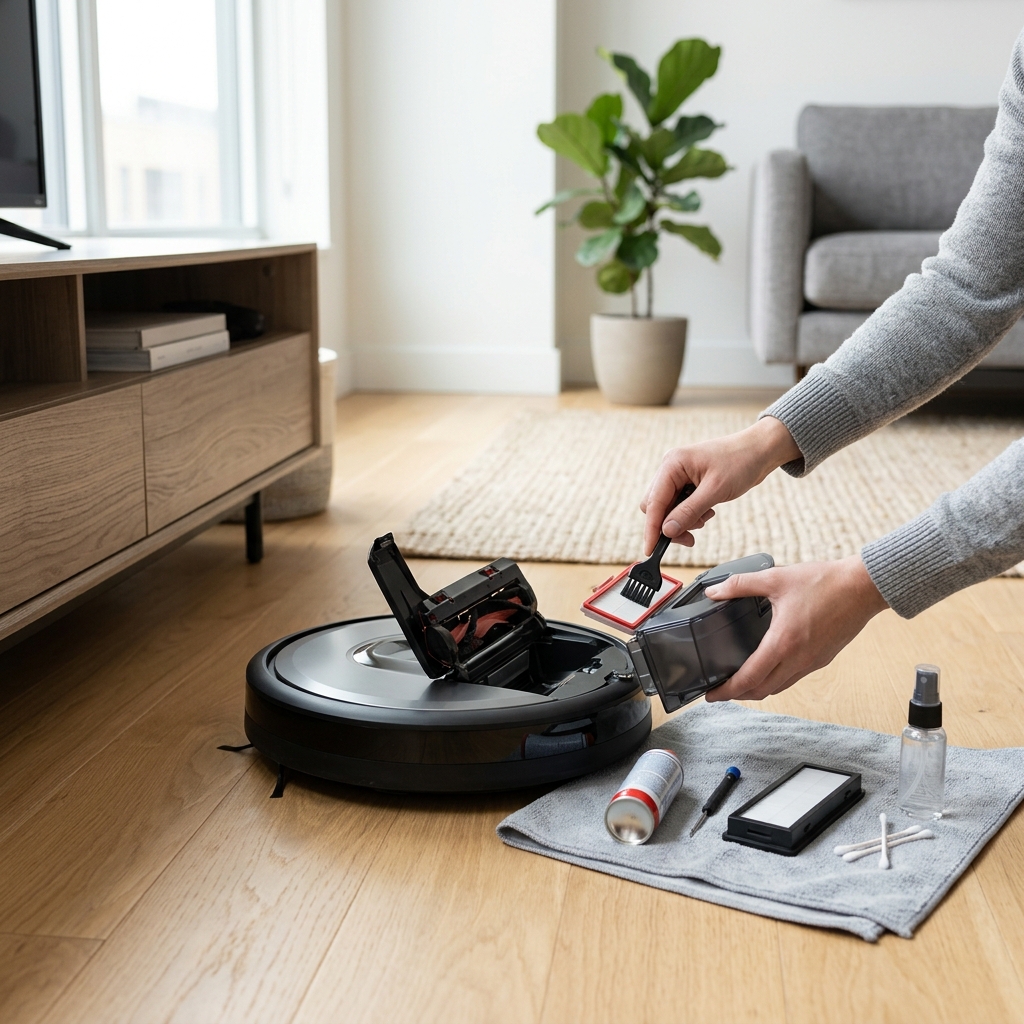
Daily & Post-Clean Maintenance: Quick Wins for Longevity
These are the tasks you should perform *after every use* to keep your robot vacuum in top condition. They’re quick, easy, and make a huge difference.
- Empty the Dustbin: This is the most crucial daily task. A full dustbin significantly reduces suction. For self-emptying models like the Ecovacs Deebot X2 Omni (£999.00), check the dustbin emptying station (available for £149.00) and empty it when full.
- Clean the Brushroll: Hair, threads, and debris easily become tangled around the brushroll, hindering its ability to effectively sweep floors. Remove the brushroll and carefully cut away any tangled materials.
- Wipe Down Sensors: Robot vacuums rely on sensors to navigate and avoid obstacles. Dust and grime can interfere with these sensors. Use a soft, dry cloth to gently wipe down all visible sensors.
Weekly Deep Cleaning: Beyond the Basics
Once a week, dedicate a little more time to a more thorough cleaning. These tasks build on the daily maintenance and address areas that accumulate dirt over time.
- Wash Filters: Most robot vacuums have washable filters. Refer to your user manual for specific cleaning instructions. Allow the filters to dry *completely* before re-installing them. Replacement iRobot Roomba Filters (Pack of 3) cost £24.99.
- Clean Side Brushes: Remove the side brushes and clean them of any accumulated dust and debris. Replace them if the bristles are bent or worn.
- Check and Clean Wheels/Tracks: Hair and debris can get wrapped around the wheels or tracks, impacting movement. Remove any obstructions and wipe down the wheels/tracks.
- Inspect Cliff Sensors: These sensors prevent the robot from falling down stairs. Ensure they are clean and unobstructed.
Safety Precautions: Always switch off and unplug the robot vacuum before performing any deep cleaning tasks. Never use water directly on the robot’s body. Ensure all parts are completely dry before reassembling.
Monthly Maintenance: Preventing Hidden Issues
These less frequent tasks help prevent hidden problems and ensure long-term reliability.
- Deep Clean the Dustbin: Even with regular emptying, dust and grime can accumulate inside the dustbin. Wash it with warm, soapy water and allow it to dry completely.
- Check for Blockages: Inspect the suction path for any blockages that might be restricting airflow. Use a long, flexible tool to dislodge any obstructions.
- Inspect Charging Contacts: Clean the charging contacts on both the robot and the charging base with a dry cloth. This ensures a good connection for charging.
- Run Diagnostic Tests: Many modern robot vacuums offer diagnostic tests through their companion apps. Run these tests to identify potential issues.
Battery Care: Maximising Battery Life in 2026
Lithium-ion batteries remain the dominant power source for robot vacuums in 2026. Proper battery care is crucial for maintaining optimal performance and extending its lifespan.
- Avoid Full Discharge: While it’s okay to let the battery discharge occasionally, consistently running the robot until the battery is completely empty can shorten its lifespan.
- Avoid Overcharging: Leaving the robot on the charger continuously, even after it’s fully charged, can also degrade the battery. Many models now feature smart charging that prevents overcharging.
- Storage Guidelines: If storing the robot for an extended period, charge the battery to around 50% and store it in a cool, dry place. Avoid extreme temperatures and humidity.
- Signs of Degradation: Reduced run time and difficulty holding a charge are signs of battery degradation. Expect a Lithium-ion battery to last between 2-3 years with proper care.
Troubleshooting Common Robot Vacuum Issues
Here are some common problems and DIY solutions:
- Navigation Errors: Ensure sensors are clean and the floor isn’t cluttered. Restart the robot and re-map your home if necessary.
- Weak Suction: Empty the dustbin, check for blockages, and clean or replace the filters.
- Brushroll Not Spinning: Remove the brushroll and check for tangled debris. Ensure the motor is not obstructed.
- Error Codes: Refer to your user manual for the meaning of specific error codes and troubleshooting steps.
- Wi-Fi Connectivity Issues: Restart your router and the robot. Ensure the robot is within range of your Wi-Fi network.
When to Seek Professional Help: If you’ve tried these troubleshooting steps and the problem persists, contact the manufacturer or a qualified repair technician.
Replacing Parts: Knowing When & Where to Buy
Certain parts will need replacing over time. Here’s a guide:
| Part | Replacement Frequency | Approximate Cost (GBP) |
|---|---|---|
| Filters | Every 3-6 months | £24.99 (Pack of 3) |
| Brushes (Main & Side) | Every 6-12 months | £39.99 (Roborock Brushroll) |
| Batteries | Every 2-3 years | £80 – £200 (depending on model) |
| Dustbin Emptying Station Filters | Every 3-6 months | £20-£30 |
Finding Genuine Replacement Parts: Purchase replacement parts directly from the manufacturer’s website or from reputable retailers like Argos, Currys, and John Lewis. Avoid cheap imitations, as they can damage your robot vacuum.
Maintaining Software & Firmware (2026 Focus)
In 2026, robot vacuum software is constantly evolving. Keeping your robot’s firmware updated is crucial. Updates improve cleaning performance, add new features (like improved object recognition), and fix security vulnerabilities. Most robot vacuums update automatically via Wi-Fi, but you can often manually check for updates through the companion app. App-based maintenance features often include cleaning schedules, zone cleaning, and no-go zone setup.
Winter Care: Protecting Your Robot Vacuum in Cold Weather
Cold weather presents unique challenges for robot vacuums:
- Battery Performance: Cold temperatures can reduce battery life. Ensure the robot is fully charged before each cleaning session.
- Humidity: Increased humidity can lead to condensation, potentially damaging electronic components. Store the robot in a dry place when not in use.
- Floor Debris: Winter weather brings more dirt, salt, and grit indoors. Increase the frequency of dustbin emptying and filter cleaning. Consider using a Robot Vacuum Cleaning Solution (£19.99) for mopping robots to tackle stubborn stains.
Conclusion: A Little Maintenance Goes a Long Way
Maintaining your robot vacuum is a small investment of time that yields significant returns. By following these simple tips, you can extend its lifespan, maintain its cleaning performance, and avoid costly repairs. Remember, a well-maintained robot vacuum is a happy robot vacuum – and a happy home!
FAQ
- How often should I replace the filters? Every 3-6 months, depending on usage and the amount of dust and debris in your home.
- Can I use any cleaning solution on my robot vacuum? No. Only use cleaning solutions specifically designed for robot vacuums. Avoid harsh chemicals or abrasive cleaners.
- My robot vacuum is getting stuck frequently. What should I do? Ensure sensors are clean, the floor is free of obstacles, and the robot has been properly mapped.
- How long does a robot vacuum battery typically last? A Lithium-ion battery typically lasts between 2-3 years with proper care.
- Is it worth buying a self-emptying robot vacuum? If you have pets or a large home, a self-emptying robot vacuum can save you significant time and effort.